You tap send in your wallet and the transaction just sits there marked Pending. Or you wait ages, check the block explorer and it says Failed — the coins never arrived, but the fee is gone. Both look like a transfer that went wrong, and the two need completely different handling. What follows applies to Ethereum and EVM-compatible networks; TRON bills transactions through energy and bandwidth instead, and those rules are in what a gas fee is.
First, Tell Them Apart: Stuck, Failed, or Never Sent
Work out which of the three you are looking at. For the first two, the TxID and a block explorer will show you straight away:
- Pending: the transaction has been submitted and is waiting to be included in a block. Ethereum's own documentation puts it plainly — if the gas price you offered is too low, validators are unlikely to pick your transaction up, so it may be delayed, or never execute at all.
- On-chain but failed: the transaction was included in a block, but something went wrong while it was executing — a smart contract running out of gas partway through, for instance. This one costs you the fee, which the next section explains.
- Rejected during validation: the transaction never made it into a block at all. The example ethereum.org gives is a plain ETH transfer with the gas limit set to 20,000 when 21,000 is required: the transaction is rejected before it can be included in a block, and no gas is consumed.
Never used a block explorer? Start with where to find the TxID and what each field on the explorer means, then look yours up.
Why a Failed Transaction Still Costs Gas
The Gas and fees page on ethereum.org says it directly: a gas fee is the amount of gas an operation consumes multiplied by the cost per unit of gas, and the fee is paid regardless of whether a transaction succeeds or fails. The failure meant here is a transaction that reached the chain and then failed while executing; one rejected at the validation stage costs you nothing.
The reasoning is that the network has already done the computation on your behalf. The same page, in its section on the gas limit, notes that:
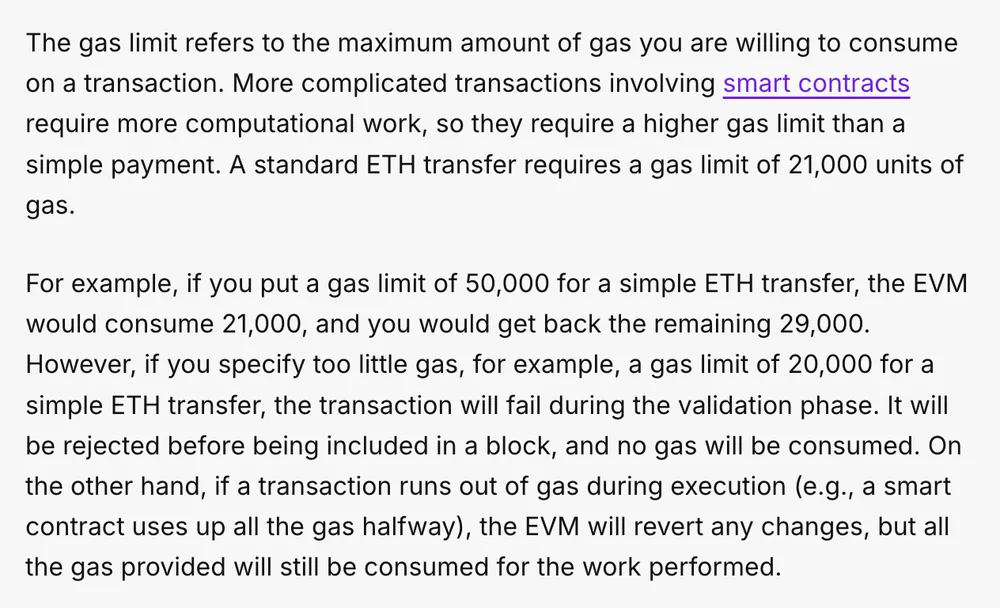
- when a transaction runs out of gas during execution, the EVM will revert any changes — the coins you were sending do not move;
- but all the gas provided will still be consumed for the work performed.
So when a transaction fails partway through execution, the coins stay where they were, but the fee already spent is gone for good. Pull the transaction up on a block explorer and you will see the deduction is in ETH (on other EVM-compatible networks, usually that network's native coin), not in the token you were trying to send.
As for how the fee itself is put together, the example on the same page is a single ETH transfer: 21,000 units of gas, a base fee of 10 gwei and a priority fee of 2 gwei, which comes to 21,000 × (10 + 2) = 252,000 gwei, or 0.000252 ETH. On Ethereum mainnet the base fee portion is burned and the priority fee goes to the validator. Wallets normally fill in a suggested fee for you: the base fee plus a suggested priority fee.
Stuck on Pending: Wait, Speed Up, Cancel
The button names below come from the MetaMask help centre article on speeding up or cancelling a pending transaction; other wallets do not necessarily give you those two buttons.
- Restart the wallet first. MetaMask's opening suggestion is to quit completely, close the browser, then reopen and unlock it; on a phone, close the app and open it again.
- Wait. A transaction that bid low can sit there a long time, and may never be included in a block at all; if waiting gets you nowhere, use speed up or cancel below. Etherscan's gas tracker shows roughly what the going rate on Ethereum mainnet is at the moment.
- Speed it up. Hit Speed up and the wallet resubmits the same transaction with the same nonce and a higher gas fee. Because the nonce is unchanged you do not pay the gas twice, but this transaction does end up costing more.
- Cancel it. Hit Cancel; a cancellation can only be attempted while the transaction is still pending, and a confirmed transaction cannot be undone.
The rules for cancelling by hand: MetaMask describes a second route as well — a custom nonce. Send yourself a new transaction carrying the same nonce as the pending one (the amount can be 0), bidding higher than the original: the priority fee at least 10% higher (30 gwei originally, so set 33–35 gwei), the max fee at least 30% higher, and the gas limit equal to or a little above the original. When several are stuck, cancel them in order, starting from the lowest (oldest) nonce — nonce 9 has to be dealt with before nonce 10. In the browser extension, transactions on Ethereum mainnet or BNB Smart Chain need Smart Transactions switched off before the custom nonce box appears; switch it back on when you are done. On mobile, turn on Customize transaction nonce under Settings > Advanced.
While It Is Stuck, Don't Resend and Don't Let Anyone Speed It Up for You
- Don't fire off the same transfer over and over. A wallet will normally queue the new transaction behind the stuck one, and until the first one confirms, the second cannot go through either — and cancelling still means working forward from the oldest. If you want it to move, use speed up.
- Ignore anyone who messages you out of the blue offering to speed it up. Speeding up and cancelling both happen inside your own wallet. Nobody needs your seed phrase or private key for it, and there is no reason to go and connect your wallet to an unfamiliar site. For how an address gets swapped while you copy it, see address poisoning and clipboard hijacking.
A Stuck Exchange Withdrawal Is a Different Matter
Everything above concerns a transaction sent from your own wallet. When you withdraw from an exchange such as Binance, the on-chain transaction goes out from the platform's address rather than yours, so the speed up and cancel routes are not open to you. If the platform says sent and the other side has not received it, the steps for checking confirmations are in sent but not received.
For a transfer you have not sent yet, push a small amount through first and send the full sum once that lands.
Frequently Asked Questions
My transfer says failed — did my coins go out?
No. Ethereum's documentation explains that when a transaction runs out of gas during execution, the EVM reverts every change that transaction made, so the coins you were sending are still sitting at your address; the gas supplied for that execution, however, has been consumed and is not refunded. Look the TxID up on a block explorer and you will see the status of the transaction and the fee that was actually deducted.
Do all failed transactions cost gas?
No. ethereum.org gives the example of a plain ETH transfer with the gas limit set to 20,000 when 21,000 is needed: the transaction fails at the validation stage and is rejected before it is included in a block, consuming no gas at all. Only a transaction that reached the chain and then failed partway through execution costs you gas.
My transfer is stuck on Pending — will sending another one make it faster?
It will not make the first one any faster. Ethereum's documentation notes that a transaction that bids too low may be delayed; the speed up button in a wallet resubmits the same transaction with the same nonce and a higher gas fee, so you do not pay the gas twice. A separate new transaction generally just queues behind the first one, and MetaMask's instructions also point out that cancellations have to be worked through in order, starting from the oldest pending transaction.
Can a transfer that is already confirmed still be cancelled?
No. The MetaMask help centre states that a cancellation can only be attempted while the transaction is still pending on the network, and that a confirmed transaction cannot be reversed. Sending to the wrong address or over the wrong network is a different class of problem and has to be handled on its own terms.